Designing a multi-tenant system is fun as long as you get the data isolation done right. If not it could be painful. 😀 In a previous post, I explained how we utilised Row Level Security to enforce data isolation in one of the multi-tenant solutions that I worked with in the past. While Row Level Security enforced “hard” isolation, we had another use case for a “soft” isolation within each tenant.
The term “hard” here refers to isolation in almost all cases except for instances like tenant onboarding where we don’t have a tenant yet. On the other hand, “soft” here refers to cases like the following. For example, say we have users A1, A2 and A3 under Tenant A but the user A3 is only allowed to access data under Sub-Tenant Y. So when user A1 logs in they can see data across Sub-Tenants X, Y & Z but when user A3 logs in he/she can only see data from Sub-Tenant Y.
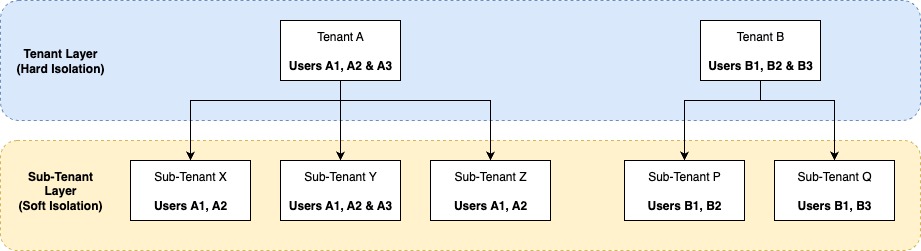
In this post, we will look at some of the possible approaches to achieve this soft isolation and how we ended up using Hibernate Filters coupled with Spring Aspects as the solution.
Possible Solutions
Trivial Approach – Where Clauses
The most trivial approach is using custom where clauses in the query and with Spring JPA it would be something like findAllBySubTenantId(). This basically places the responsibility on the individual developer as nothing is enforced on the platform level. We wanted a better approach.
Spring Post Filter
Spring’s @PostFilter was one of the possible options. This would allow us to filter lists of objects based on a custom sub-tenant security rule which we define. However, this was not ideal as using this would mean all data (within the tenant and across all the sub-tenants) will be returned to the backend from the db query before they are filtered and sent out.
interface TransactionRepository : JpaRepository<Transaction, Long> {

    @PostFilter("hasPermission()")
    override fun findAll(): Iterable<Transaction>?
}
Hibernate Filters
Hibernate Filters (@Filter & @FilterDef) are functionality from Hibernate that allows us to filter data using custom SQL criteria and this allows us to parameterise the filter clause at runtime as well.
Refer to this blog post from Thorben Janssen to get a quick overview of the capabilities of Hibernate Filters.
Using Hibernate Filters coupled with Spring Aspects
Step 1 – Filter Definition using @FilterDef
The first step is to define a filter. Note that we are defining the filter on a base class to avoid having to define the filter multiple times.
const val SUB_TENANT_FILTER_NAME = "SubTenantFilter"
const val SUB_TENANT_PARAM_NAME = "SubTenantParams"
const val SUB_TENANT_FILTER_DEFAULT_CONDITION = "sub_tenant_id in (:$SUB_TENANT_PARAM_NAME)"

@FilterDef(name = SUB_TENANT_FILTER_NAME,
    parameters = [ParamDef(name = SUB_TENANT_PARAM_NAME, type = "string")],
    defaultCondition = SUB_TENANT_FILTER_DEFAULT_CONDITION
)
@MappedSuperclass
@QueryExclude
open class SubTenantFilterDef
Step 2 – Setting Filter On Entities using @Filter
Next, the filter has to be set on the entity. (Note that this is a simplified entity.)
@Filter(name = ENTITY_FILTER_NAME)
@Entity(name = "TRANSACTION")
class Transaction(
    @Id
    @GeneratedValue(strategy = GenerationType.IDENTITY)
    var id: Long? = null,
    @Version
    var version: Long = 1L,
    var txnVersion: Long,
    var txnDate: LocalDate? = null,
    var txnType: String,
) : SubTenantFilterDef()
Step 3 – Enabling the Filter with Params
This is where the aspect comes into play. In our case, we enable the filter on Spring Repository method calls. Please note that this is not the final version we used but a simplified version of it and the getSubTenantIdParams() which is abstracted out here is retrieving the Sub Tenant Id params from the Spring Security Context.
@Aspect
@Component
class SubTenantFilterAspect(
    private val tenantEntityManager: EntityManager
) {

    @Pointcut("execution(* org.springframework.data.repository.Repository+.*(..))")
    fun isRepositoryMethodCall() {
        /* aspect pointcut definition to detect repository method call */
    }

    @Around("isRepositoryMethodCall()")
    fun activateTenantFilter(pjp: ProceedingJoinPoint): Any? {
        LOGGER.debug { "ActivateTenantFilter advice is fired with pjp: $pjp" }
        if (pjp is MethodInvocationProceedingJoinPoint) {
            val declaredAnnotations = (pjp.signature as MethodSignature).method.declaredAnnotations
            val isFilterDisabled = declaredAnnotations.any { it.annotationClass == SubTenantFilterDisabled::class }
            if (!isFilterDisabled) {
                val session: Session = tenantEntityManager.unwrap(Session::class.java)
                val filter = session.enableFilter(SUB_TENANT_FILTER_NAME)
                val subTenantIdParams: getSubTenantIdParams()
                filter.setParameterList(SUB_TENANT_PARAM_NAME, subTenantIdParams)
                LOGGER.debug { "SubTenant filter is enabled with $SUB_TENANT_PARAM_NAME: $subTenantIdParams" }
            } else {
                LOGGER.debug {
                    "SubTenantFilterDisabled annotation is present in declaredAnnotations: " +
                            "$declaredAnnotations. Hence sub tenant filter will not be enabled."
                }
            }
        }
        return pjp.proceed()
    }

    companion object {
        private val LOGGER = KotlinLogging.logger { }
    }
}
Note that you would need the following annotations for the aspect to work.
@EnableAspectJAutoProxy(proxyTargetClass = true)
@EnableTransactionManagement(proxyTargetClass = true)
Bonus – Disabling Filter on Selected Repository Methods
You might have already noticed the usage of SubTenantFilterDisabled in SubTenantFilterAspect above. The idea is to use an annotation on the repository calls, in case we need to disable the Hibernate filter and the aspect takes this into consideration when deciding to enable the filter.
@Target(AnnotationTarget.FUNCTION)
@Retention(AnnotationRetention.RUNTIME)
@Inherited
@MustBeDocumented
annotation class SubTenantFilterDisabled
Limitations of Hibernate Filters
Hibernate filters apply to entity queries, but not to direct fetching. For example, if you use direct entity fetching by ID (e.g., session.get(Transaction.class, id)) or use entityManager.find(…) the filter is not applied. This is something for the developers to be careful about if this approach is used. We could use something like ArchUnit to have some tests to prevent such usages as well.
Give this approach a try and have fun. 🙂
References
- https://rajind.dev/2024/08/25/multi-tenant-data-isolation-row-level-security/
- https://docs.jboss.org/hibernate/orm/5.6/userguide/html_single/Hibernate_User_Guide.html#pc-filter
- https://thorben-janssen.com/hibernate-filter/#limitations-and-pitfall-when-using-filters
~ Rajind Ruparathna

 Notebook